
-
Our Services
- AI with HKPC PICASSO
- The Cradle – Go Global Service Centre
- New Industrialisation
-
Smart Manufacturing
- Smart Manufacturing
- IIOT
-
AI & Robotics
- AI & Robotics
- Unmanned Logistics Center Technology
- Applying Embodied Intelligence to Industrial Operations
- AI Sheet Metal Surface Defect Detection Technology
- Product Innovation and Design Management
- Smart Manufacturing/ New Industrialisation Assessment and Implementation
- Application and Research on Vision and Ultrasonic Inspection Assisted by Artificial Intelligence and Robotics
- Development and Implementation of Intelligent Production Lines
- Autonomous Air-ground Cooperative Tunnel Inspector
- AR-Empowered Robot Control System (ARERC System)
- IoT-enabled Smart Toilet Bowl Cleaning System
- Novel Materials
-
Advanced Manufacturing Technology
- Advanced Manufacturing Technology
- 3D Scanning and Reverse Engineering Service
- Flexible Metallic Fiber Physical Porous Part Fabrication Technology
- Dual Laser Metal Polishing Technology
- Advanced Additive Manufacturing, 3D Printing Technology, and Direct Manufacturing
- Electrically-Assisted Free Forming (EAFF) Technology for Customisation of Sheet Metal Parts
- Plastic Process and Machinery Technology
- Fashion and Garment Technology
- Watch Assembly Automation Technology
-
HealthTech and Traditional Chinese Medicine
- HealthTech and Traditional Chinese Medicine
- R&D service and Functional Investigation on Chinese Medicine, Health Food & Wellness product
- Compliance Consultation Service for Chinese Medicine, Pharmaceutical, Health Food and Medical Device Industries
- Manufacturing Enhancement - Automatic Intelligent System for Production and Packaging in Chinese Medicine, Pharmaceutical and Health Food Industries
- Assisting funding application for local medicine and health industrial associations
- “The Cradle” Services for Health Tech and TCM Industry
-
Digital Transformation
- Digital Transformation
- HKPC Digital DIY Portal
- Digital Transformation Support
- Intelligent Integrated Non-wearable and Wearable Health Monitoring System and App for Elderly Homes
- Smart Solution
- Research and Analytics
- Embedded Software System
- DevOps Maturity Assessment and Consultancy Service
- Software Testing Automation Consultancy Service
- Blockchain Consulting Service
- Extended Reality (XR) technology and consultancy service
-
Cyber Security
- Cyber Security
- Cyber Security
- Cybers Security-by-design, Privacy and Compliance-by-default
- Design & Architecture
- Train & Develop
- Offensive Security
- Intelligent Security
- Defensive Security
- Intelligent Hardening
- Internet of Things (IoT) & Operational Technology (OT) Cyber Security Testing
- Phishing Defence Services
- Cyber Security Assessment & Audit
- Cyber Security Consultancy for i4.0 & e4.0
-
Green & Smart Living
- Green & Smart Living
- Green Technology
- Food Technology
- Smart Living
-
Corporate Sustainability
- Corporate Sustainability
- ESG and Sustainability Services
- Manufacturing Technology (Tooling, Metals & Plastics) Recognition of Prior Learning (RPL) Mechanism
- Market Research and Analytics
- Business Innovation
- Sustainability-related Standards and Guidance
- Organisation Innovation Capability Development
- District Innovation
- Customer Service Assessment
- Intellectual Property (IP) Protection and Management
- Support to Creative Industries
- Manufacturing Standards Consultancy Service
- Production Capacity Optimisation
- Cost of Quality
- HKPC Academy
- SME Support
- Funding
- Testing & Standards
- Venues & Facilities
-
Support & Resource
- Technology Transfer
-
Support Centres
- Support Centres
- Deep Tech Innovation Hub
- Circularity Research Centre
- Future Life and Health Tech Centre & Future FoodTech Lab
- Hong Kong Industrial Artificial Intelligence Robotics Centre (FLAIR)
- Intellectual Property Services Centre
- The Cradle – Go Global Service Centre
- Agentic AI and Industrial Metaverse Hall
- HKPC-HP 3D Printing Technology Centre
- Future Manufacturing Hall
- Hong Kong Technology and Innovation Support Centre
- Inno Space
- The HATCH
- Advanced Electronics Processing Technology Centre
- Green Living Laboratory
- Reliability Testing Centre
- Electromagnetic Compatibility Centre
- Plastics Technology Centre
- Smart Wearables, Watch & Clock Technology Centre
- Hong Kong Digital Testing Hub
- Hong Kong Industrial Drone Technology Centre
- Aqua Research Laboratory
- Advanced Materials and Intelligent Manufacturing Centre
- Hong Kong Joint Research Lab for Applications of Intelligent Automation Technology
- Testing & Standards
- HKPC Spotlights
- About US
-
 LANGUAGE
HKCERT Urges Summer Travellers to Beware of Phishing and Scams Targeting Travel Booking Platforms and Instant Messaging Apps
 (Image created using generative AI and reviewed under professional human supervision.)
(Hong Kong, 29 June 2026) With summer holidays just around the corner, many citizens are booking flights and hotels, and planning trips. The Hong Kong Computer Emergency Response Team Coordination Centre (HKCERT) urges the public to stay vigilant: scammers are exploiting increased travel demand to launch phishing attacks related to travel bookings.
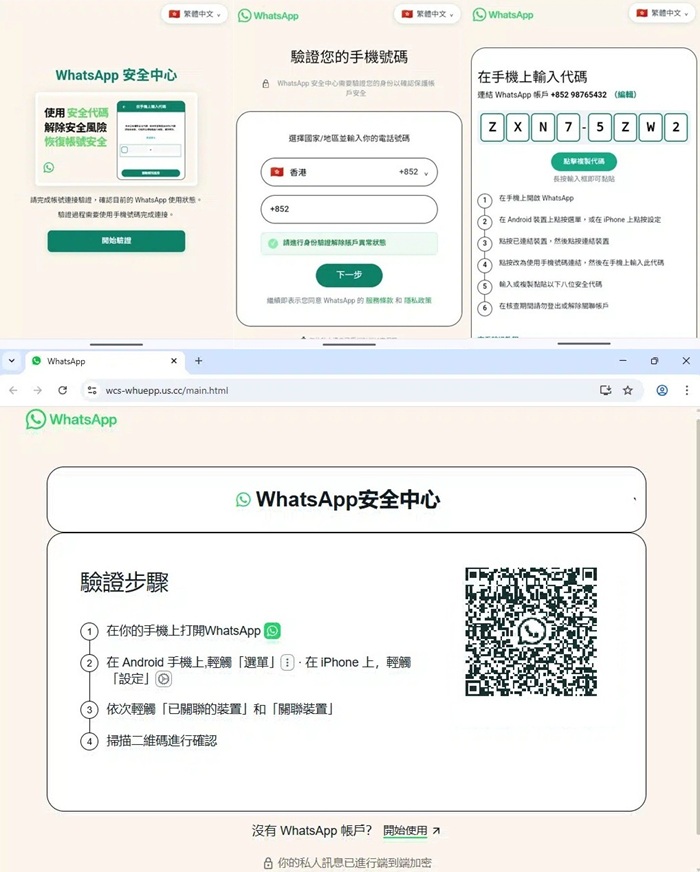
HKCERT recently spotted scammers using genuine reservation details, suspected to have originated from an earlier Booking.com data leak, to impersonate the platform or hotels and send phishing emails and WhatsApp messages to travellers. HKCERT has also received reports of WhatsApp account takeovers. Scammers may set up phishing sites that resemble the official WhatsApp website to trick users into pairing their accounts to attacker-controlled devices. In some cases, they may also exploit known, older vulnerabilities in unpatched operating systems and outdated WhatsApp versions to hijack accounts.
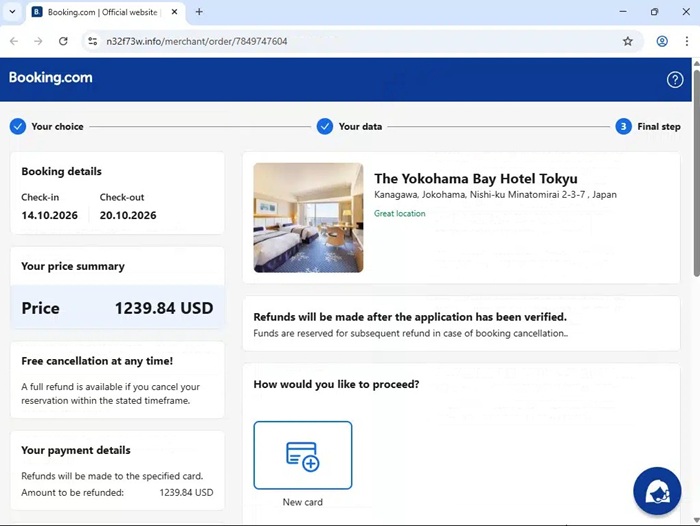
Booking.com Leak Fuels "Hyper-targeted" Phishing Scams
HKCERT has previously issued a phishing alert about this trend, warning the public about messages that impersonate Booking.com or hotel booking notifications. Using suspected leaked booking details, scammers send convincing emails and WhatsApp messages to travellers, claiming issues such as “booking problems” or “payment authorisation failed”, or urging users to update payment details within a limited time to avoid cancellation.
As these messages may include genuine details such as the traveller’s name, hotel name, check-in dates or itinerary, victims are more likely to trust them. They may then click links to fake login, payment or verification pages and enter account passwords, credit card information or one-time passwords, resulting in financial loss or personal data exposure.
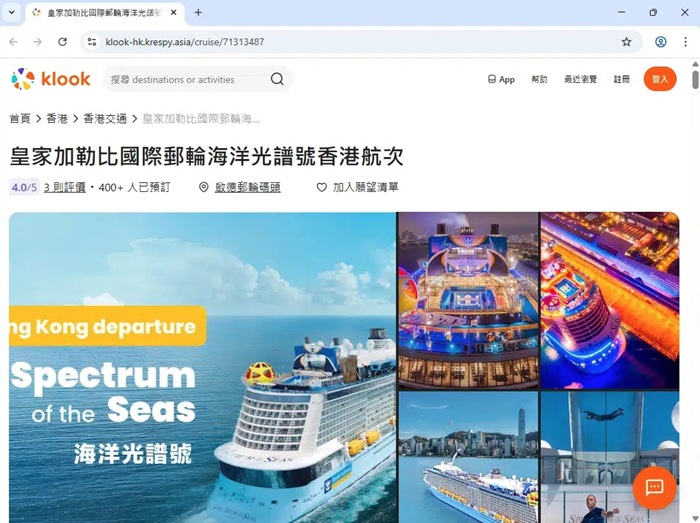
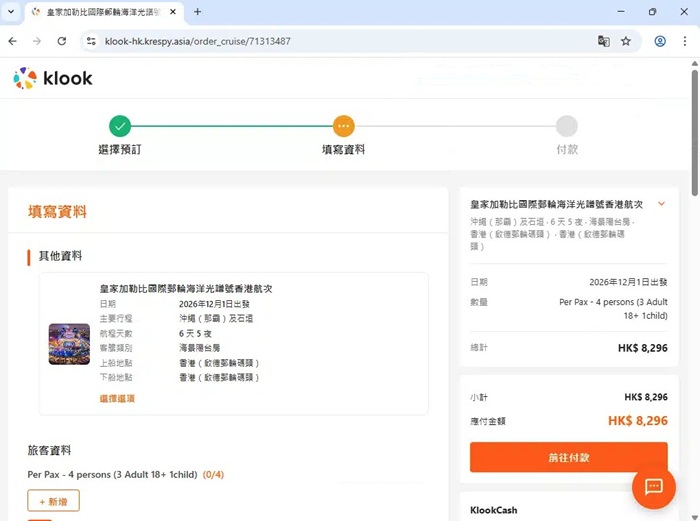
Hijacked WhatsApp Account Used for Further Fraud
Beyond travel booking related scams, HKCERT has recently received cases involving hijacked WhatsApp accounts. Scammers may send messages falsely claiming that a user’s WhatsApp account has been “locked due to security risks”, urging them to click a phishing link to verify or unlock. They may also host phishing sites that closely resemble the official WhatsApp website. After a victim lands on the phishing site, if they use WhatsApp’s “Linked devices” feature to scan the QR code shown on the phishing site, or select “Link with phone number” and enter a so called verification code shown on the phishing page, their WhatsApp account may be linked to an attacker controlled device. The attacker can then access the account without authorisation and impersonate the victim to send fraudulent messages to family, colleagues or business contacts, causing further losses.
In addition, recent overseas research shows that some iPhone users may have their accounts hijacked even without clicking suspicious links, scanning QR codes, entering verification codes, or linking any new device in WhatsApp. Attackers may exploit known, older vulnerabilities in iOS and WhatsApp to take over accounts without user interaction. This shows that account compromise is not always due to falling for phishing or user error; using devices and apps running older system versions also carry risk.
HKCERT advises users to promptly update their systems and WhatsApp to the latest versions, enable WhatsApp’s two step verification, and watch for any unusual account activity. For more details, please refer to the HKCERT security bulletin: https://www.hkcert.org/security-bulletin/whatsapp-security-restriction-bypass-vulnerability_20250901
Scammers Exploit Real Details and a Sense of Urgency to Make Victims Let their Guard Down
Recent phishing attacks often combine real data (e.g. username, hotel name, check in date, booking details) with urgent language such as “account locked”, “payment failed”, or “booking will be cancelled if not handled immediately”, pressuring users to act before verifying.
Phishing is not limited to email. Scammers increasingly send messages via WhatsApp and other instant messaging platforms, steering victims to fake websites to enter credit card information, one time passwords, and even to operate account security features, making the ploy more deceptive.
In addition, during major sporting events such as the FIFA World Cup, related topics are frequently exploited by scammers to launch phishing attacks. Scammers may set up fake ticketing websites, post on social media, or send messages impersonating official sources, and use lures such as “limited-time discounts,” “insider tickets,” and “free or low-cost live streams” to trick users into clicking phishing links, making payments, or installing fake apps, ultimately stealing personal and financial data, including credit card information.
HKCERT's Cybersecurity Advice
To enjoy safer travel this summer and protect your personal data, finances and accounts, HKCERT recommends the following measures:
- If you receive notifications about travel bookings, payments or account security, verify directly via the official app or by manually entering the official website address. Do not click links in messages.
- Carefully check the sender’s email address and the full URL. Even if a message includes real names, hotel names, check in dates or other itinerary details, do not assume it is genuine; confirm via official channels.
- Never enter account passwords, credit card details, one time passwords or other sensitive personal data on suspicious websites.
- Only download apps from official sources and do not install apps from unknown sources.
- Regularly update the operating system and apps on your phone and other mobile devices to the latest versions and enable automatic updates to reduce risk.
- Do not trust messages claiming your WhatsApp account is locked and asking you to click a link to verify or unlock.
- Do not scan unknown QR codes, and do not, at the instruction of unfamiliar websites, use WhatsApp’s “Linked devices” feature to link any device.
- Regularly review WhatsApp’s linked devices list and remove any unknown devices immediately.
- Use strong passwords and multi factor authentication and enable WhatsApp’s two step verification to strengthen account protection.
- Regularly check bank and credit card transactions and enable transaction alerts to spot unauthorised activity early.
- If friends or family send unusual requests via messaging apps (e.g. asking for money, verification codes or to click a link), verify their identity through another channel first.
If You Suspect You have been Compromised, Act Immediately
If you suspect that you have entered personal information, login credentials or credit card details on a suspicious website, or that your WhatsApp account has been hijacked, take the following steps immediately:
- Stop communicating with the scammer and do not provide any further personal, account or financial information.
- Immediately change the passwords for the affected platforms and any other accounts that use the same or similar passwords.
- Contact your bank or card issuer at once to report the incident and request protective measures.
- Check WhatsApp’s “Linked devices”, remove any unknown devices, and enable or reset two-step verification.
- Inform family, friends and contacts that your account may have been compromised to prevent impersonation scams.
- Preserve evidence, including suspicious emails, message screenshots, URLs, website captures and transaction records, for follow-up and reporting.
-Ends-
FOLLOW US
SUBSCRIBE TO OUR NEWSLETTERS
Share the latest information of HKPC to your inbox